A UI made for visual-first chip design.
Chat with your agent. Watch the design update in real time. Block diagrams, RTL structure, and simulation results — all in one view. Not a code suggester. An agent that works.
Add a second timer peripheral to the SoC. Same pattern as timer_0, connect to APB, update testbenches.
A real task. Start to finish.
14× faster — here's exactly what happened.
An engineer needed to add a second timer peripheral to an existing SoC, connect it to the APB bus, and update all testbenches. This is what the task looked like with and without Chipmind.
Without Chipmind — ~4 hours
With Chipmind — 18 minutes
Based on an actual PoC engagement. Junior Digital IC Design Engineer, European Semiconductor Company.
Two modes. One platform. Zero disruption.
Drop into your existing environment — no rearchitecting required.
MODE 1
Interactive GUI
Work with your agents in real time. The Chipmind interface runs in your browser — no installation per user. Agents understand your design, plan tasks visually, and execute them while you stay in control.
- →Task Planner UI — visualize what the agent is doing and why
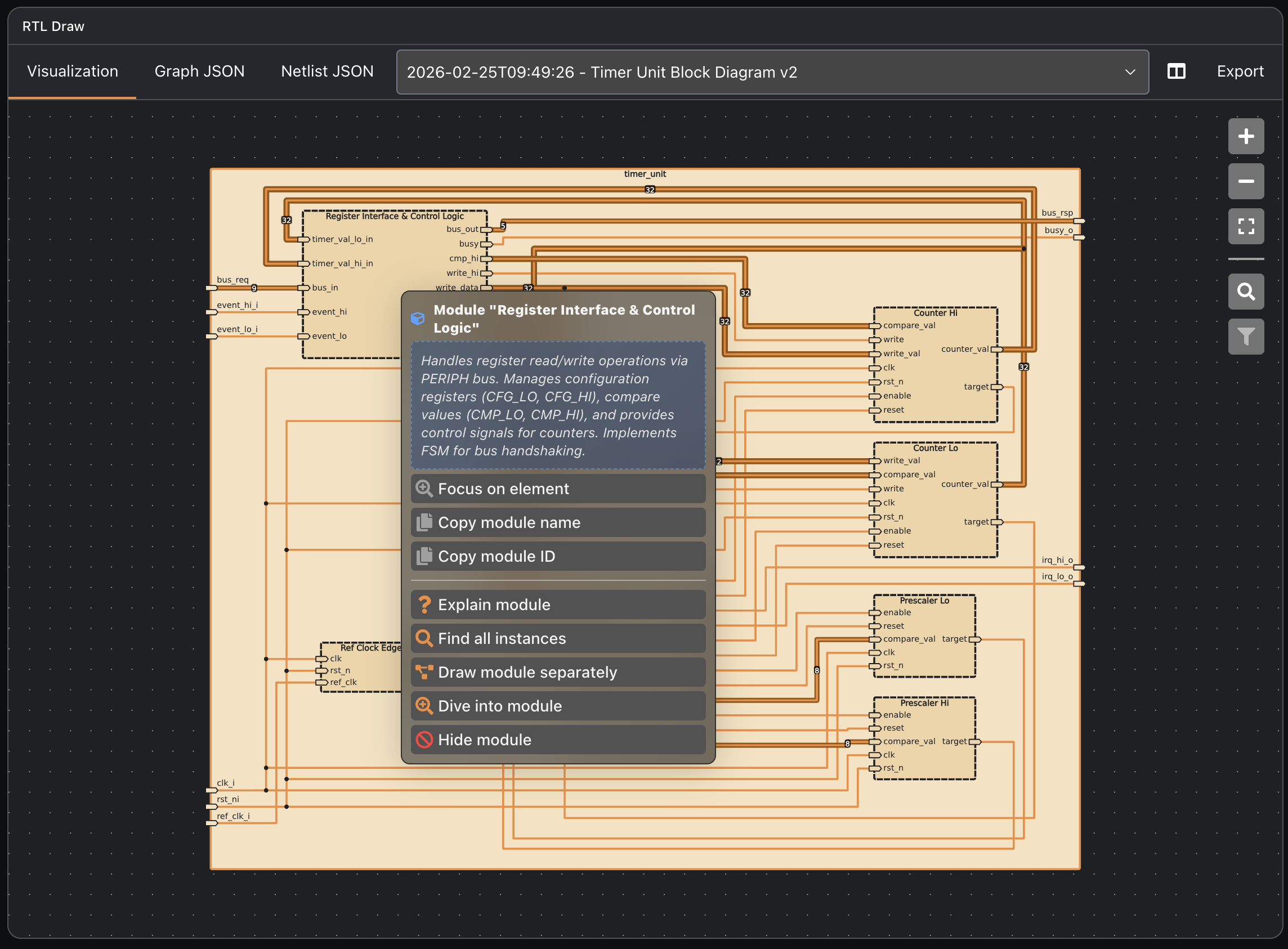
- →RTL Draw — interactive block diagrams and FSMs
- →VS Code integration — stay in your existing IDE
- →Chat-based control with full audit trail
MODE 2
Autonomous Workers
Assign tasks via GitHub/GitLab issues or @mention. Chipmind Agent Workers solve them in the background — creating specs, executing code, running verification — and report back with a PR.
Workflow:
Issue / @mention → Agent starts → Creates spec → Executes task → Opens PR → Reports back
- →Headless execution — runs in background
- →Event-triggered — responds to issues, commits, CI/CD
- →Interoperates via MCP and ACP
- →GitHub, GitLab, VS Code integrations
Whatever slows you down — Chipmind can take it on.
From RTL generation to verification, documentation to refactoring.
RTL Code Generation
- ·Fix bugs
- ·Write bus interfaces
- ·Generate modules and blocks
- ·Change registers and interrupts
- ·Create example embedded SW
Verification
- ·Create C tests
- ·Update testbenches
- ·Create DV environments
- ·Run simulation loops
- ·Update existing tests
Documentation & Visualization
- ·Generate block diagrams
- ·Create register descriptions
- ·Write and update documentation
- ·Generate visual reports
Refactoring & Maintenance
- ·Translate VHDL to SystemVerilog
- ·Explain legacy code
- ·Handle IP-XACT and SystemRDL
- ·Apply coding guidelines
Integration & Flow
- ·Create new toplevel
- ·Set up trial synthesis
- ·Integrate peripherals
- ·Setup CI/CD hooks
- ·Integrate external IP
Adaptation
- ·Apply coding guidelines
- ·Migrate to new interfaces
- ·Auto-customize to environment
- ·Apply house style
Integrations & Interoperability
Chipmind talks to your tools — and to other agents.
Not an isolated tool. Chipmind plugs into your existing workflow and communicates with other AI agents via open protocols.
Version Control
GitHub
Issues, PRs, CI/CD triggers, @mention to assign tasks
GitLab
Full GitLab integration — issues, merge requests, pipelines
Development
VS Code
Extension for interactive agent sessions inside your IDE
REST API
Programmatic access — trigger tasks, query status, retrieve results
Agent Protocols
MCP
Model Context Protocol — connect agents to external tools and data sources
ACP
Agent Communication Protocol — Chipmind agents talk to other AI agents
Agent-to-agent communication
Chipmind Agents don't just work alone. Via MCP and ACP, they interoperate with other AI agents in your organization — sharing context, delegating sub-tasks, and coordinating across tools.
Chipmind
RTL Agent
External
CI Agent
External
Doc Agent
Confidential by design
Your IP never leaves your environment. Unless you want it to.
Three deployment options — choose what fits your security requirements. Every option includes isolated execution environments and full audit trails.
Cloud — Private Endpoint
Azure/AWS with enterprise-grade data isolation. Private endpoint ensures your design data is never used for model training. Zero exposure by default.
Customer VPC — Local LLMs
Run Chipmind inside your own VPC with locally hosted models. Full control over data flow. No traffic leaves your network perimeter.
On-Prem / Air-Gapped
Local LLMs on your own GPU infrastructure. No internet connection required. Built for defence, automotive, and high-security semiconductor environments.
How we protect your IP
Isolated execution environments
Every agent task runs in a contained, ephemeral runtime. No cross-project leakage. No persistent access. Design context is loaded per task and cleaned up on completion.
No data retention
Your design files, RTL, and simulation results are never stored beyond the active task. No training on your data. No model fine-tuning without explicit consent.
Full audit trail
Every agent action — files read, commands executed, decisions made — is logged and reviewable. Complete traceability for compliance and internal review.
NDA from day one
Every engagement starts under NDA. EU-based company, GDPR compliant by default. Compatible with SOC 2, ISO 27001, and customer-specific security frameworks.
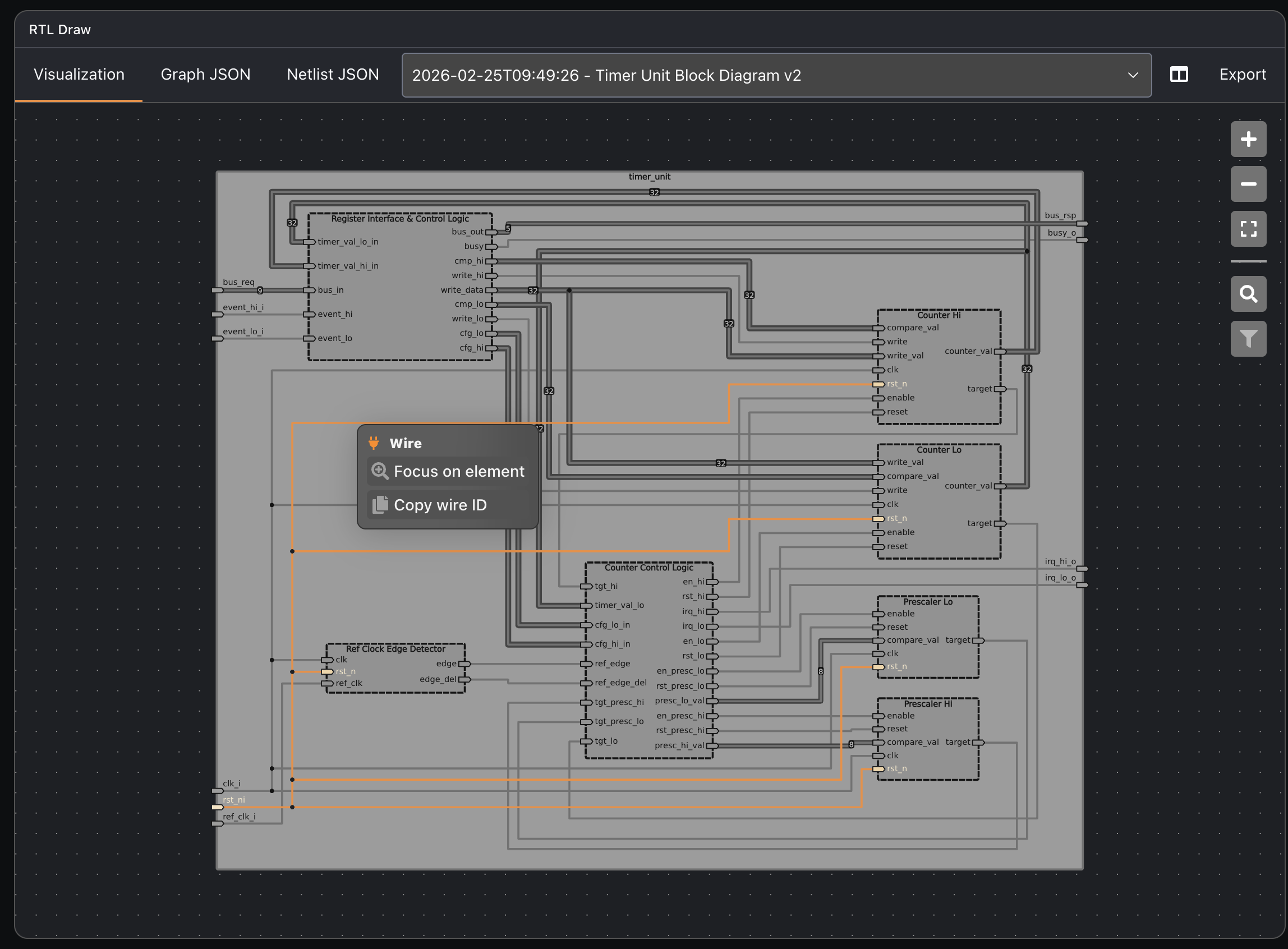
Interactive wire tracing
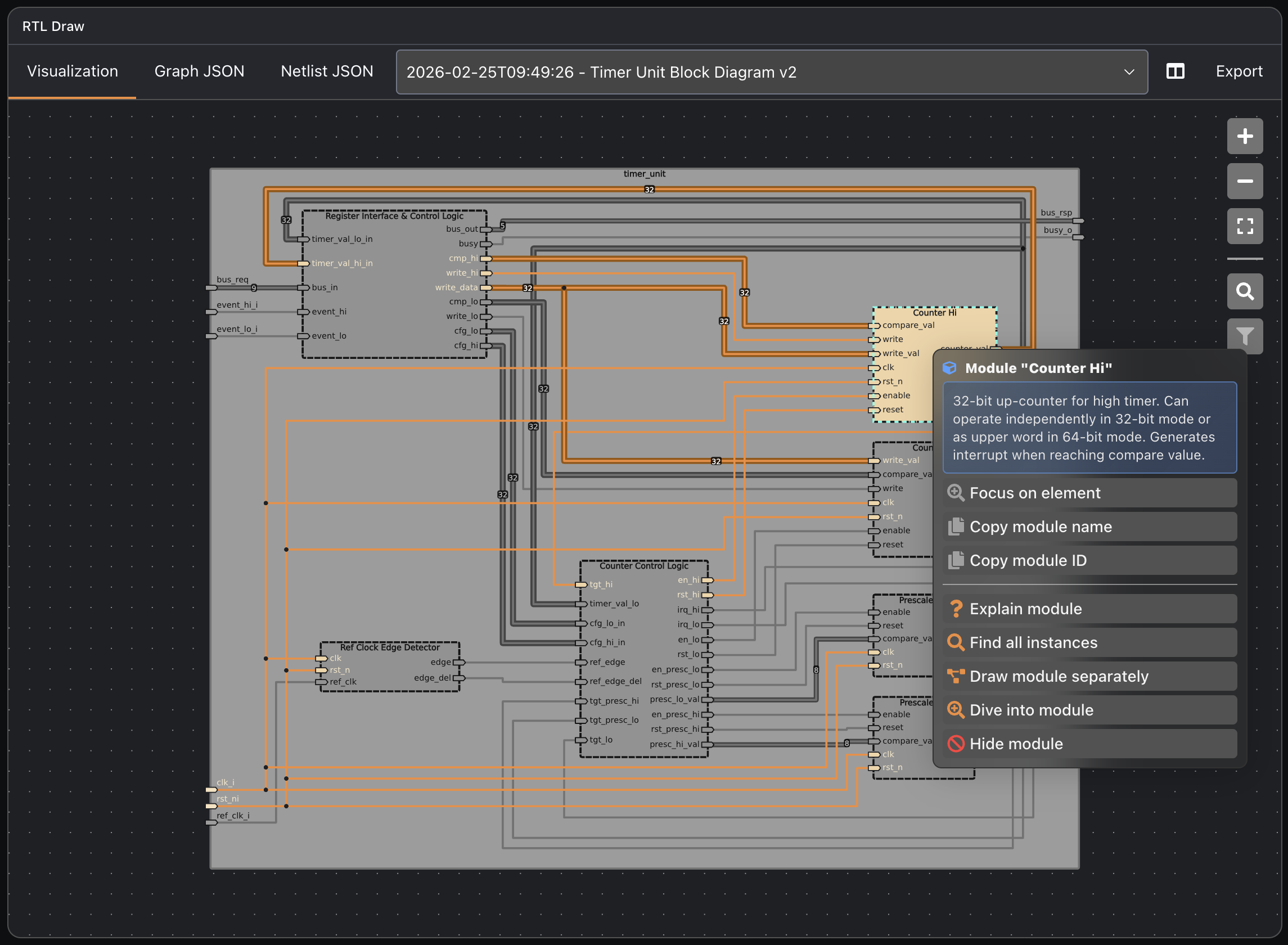
Module inspection & navigation
What engineers say after their first week.
6x faster
46 min → 7 min
"Chipmind Agents know my tool in and out. I can get the same thing done in 4 minutes with just 3 prompts."
— Senior Verification Engineer, Semiconductor Company
14x faster
4 hours → 18 min
"The agents generated all the RTL, extended the testbenches, and ran the simulation successfully."
— Junior Digital IC Design Engineer, European Semiconductor Company
4x faster
21 min → 5 min
"With Chipmind Agents this became a matter of a couple of prompts."
— Application Engineer, Digital Chip Design Service Company
Works with the tools your team already uses.
EDA-tool agnostic. If it has a scripting interface, Chipmind can use it.
EDA Toolchains
Development Environments
Don't see your tool? Contact us → — we've integrated with over 12 EDA environments in production.
Technical questions, answered.
For the senior engineers and architects evaluating Chipmind.
How does the agent actually access our design files?+
Chipmind deploys a lightweight orchestration layer in your environment (on-prem, VPC, or cloud). It connects to your VCS (Git, SVN, or Perforce), reads the relevant RTL and configuration files per task, and cleans up access on task completion. No permanent copy of your design is retained.
What happens if the agent makes a wrong decision in the flow?+
Every agent action produces a full audit trail — what was read, what was planned, what commands were executed. Results are always returned as a reviewable PR or report, never auto-committed to main. Engineers review and approve. The agent can also be configured to pause and ask for confirmation at defined decision points.
How does Chipmind handle PDK and foundry-specific constraints?+
Chipmind Agents are PDK-aware. During PoC setup, foundry PDKs and technology-specific constraints are added to the agent's context pool. Agents apply these constraints automatically during RTL generation, synthesis preparation, and DRC-aware tasks.
Can one agent instance serve multiple projects / teams simultaneously?+
Yes. The multi-agent architecture supports concurrent execution across different projects, design hierarchies, or teams. Access controls and context isolation ensure agents working on Project A have no visibility into Project B.
How long does integration into an existing flow take?+
Typically 1–2 days for the initial integration during a PoC. Chipmind's team handles the setup — VCS connection, EDA tool integration, HPC connector. No internal DevOps or ML resources are required from your side.
What's the LLM dependency — do we have to use a specific provider?+
Chipmind is LLM-agnostic. We support commercial models (GPT-4, Claude) via private endpoints, as well as open-source models (Llama, Mistral variants) running locally. For air-gapped deployments, we help you configure and optimize a local model for your specific EDA tasks.
See Chipmind
in action.
We work in your environment, with your EDA tools, on your real designs. No ramp-up. No disruption. NDA protected from day one.
- ✓6–14× speed-up on real tasks
- ✓IP stays in your environment
- ✓EDA-agnostic. No new licenses.
We respond within 1 business day. Press, investors, partnerships →